Home /
Support /
Technical Tips – Harmony Phono/RCA Plug
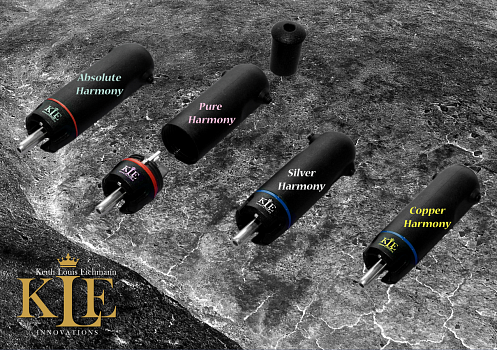
Technical Tips – Harmony Phono/RCA Plug
Connecting the Harmony®Plug to cables
- The Harmony®Plug Head is a glass impregnated thermo polymer that has ideal resonance, electrical, and thermal properties that will conform and essentially “mould” itself, quite naturally, to the RCA Socket that it is to be connected to.
- The Harmony®Plug is strong and robust but if you have limited soldering experience, ask your Dealer to do the job.
- The Harmony®Plug is designed to accept any interconnect, digital, or video cable up to 9 mm diameter. This accounts for most cables and larger cables can also be accommodated if you strip the outer sheath and feed the insulated conductors through the housing.
Step 1
- Place the Harmony®Plug on a secure but unconnected RCA Socket, where the RCA Socket becomes a holder and heat sink. This will free up both hands and allow more precise soldering. Always support the cable throughout the soldering process, so the weight of the cable does not exert undue force on the soldering tags.
- Unscrew the Harmony®Plug Housing, while leaving the Identification Collet on the Harmony®Plug Head, and slide the cable through and and prepare the Cable, as required.
- The Harmony®Plug Head comprises two solder tags, a Signal Tag(+) and Ground/Return Tag(-).
- Both tags have a V section to receive large wire, flat sides, and tag fingers that can be used to solder 1 or more wires too.
- The platform heats up rapidly allowing quick and easy soldering.
- This means a soldering iron needs only minimal time in contact with the pins to melt solder. Excess contact time with the soldering iron may deform the plastic polymer housing.
Step 2
- Tin both the wire and Harmony®Plug Tag and use only enough solder to make a good connection, ie don’t drown the platform in solder. For best results use eutectic (flowing type) solder or solder with high silver content together with a flux.
Step 3
- Solder the Ground/Return, ie Ground, conductor to the Ground(-) tag. If the Ground conductor of your cable comprises multiple strands, then twist these together and tin before connecting to the return pin. If the return conductor is in the form of a braid then split the braid, gently twist and tin before connecting to the return pin.
- If the Ground conductor on the cable comprises multiple strands, twist these together and tin before soldering to the Ground tag.
- If the Ground conductor is in the form of a braid, then insert into the V section of the Ground/Return tag and solder.
- Ensure that the Ground conductor is formed and you may need to gently bend the conductor, so the conductor sits in the V section or flush on the side of the Ground/Return tag.
- You should find that the large Ground tag makes soldering large groups of wires quite easy.
Step 4
- Solder the stripped Signal conductor to the Signal(+) tag, using a high silver content lead free solder, in the same manner as the Ground/Return(-) tag.
Step 5
- Reattach Harmony®Plug Housing but when reattaching the housing continue to support the cable to avoid undue force on the pins and soldered wires. For 9mm diameter cables you can use a silicon spray on the cable, if required, to allow smooth rotation of the outer housing.
- Insert the two Cable Retaining Screws into the Harmony®Plug Housing and tighten them, using a 1/16″ Hex Key as required, to secure and support the cable. A gentle securing action is all that is required and avoid penetrating the cable sheath through over tightening.
- Please note that a 1.5mm Hex Key or No6 Torx can work but we prefer you to use a 1/16″ Hex Key.
- Using a Multi Metre set to Small Current Connection(Amps DC), and check that the Signal has continuous current, the Ground has continuous current, and that Signal/Ground are not shorted, ie have no current across them.
Step 6… Enjoy better sound!
- Enjoy better sound! Take your time, prepare your conductors prior to connection, use good solder and benefit from the improved signal transmission the Harmony®Plug can provide. Please note: The Harmony®Plug uses a thermo polymer and the jaw design provides a secure snap-like fit on an RCA socket.
- RCA sockets tend to vary in size, but the Harmony®Plug design caters to most (if not all) sizes/variations. The thermo polymer used in the plug allows the plug to adjust (and stay adjusted) after a few hours (if not immediately) on an RCA socket.
- The objective is for the Harmony®Plug to provide a firm and secure fit on all sockets. The Harmony®Plug should have a snap-like fit on all RCA Sockets, so please do not force the Harmony®Plug onto a socket!
Step 7… Congratulations
- Congratulations, you have reached the end and hopefully been successful in creating/building your ICs (Interconnects).
- Well Done :=)
Step 8… Further Interesting Technical Tips
- We would suggest you allow >100 hrs (preferably >200 hrs) of playing music through the ICs (Interconnects) to runin the Harmony®Plugs.
- We have found when comparing ICs, due to the Harmony®Plugs having extremely high resolution, that once the ICs are attached to the RCA sockets that a period of at least 90 mins (preferably 180 mins) is required for the Harmony®Plug/Socket connections to settle before any serious listening comparisons are performed.
2014-01-29
Scroll To Top
 KLE Bartime RCA Plugs